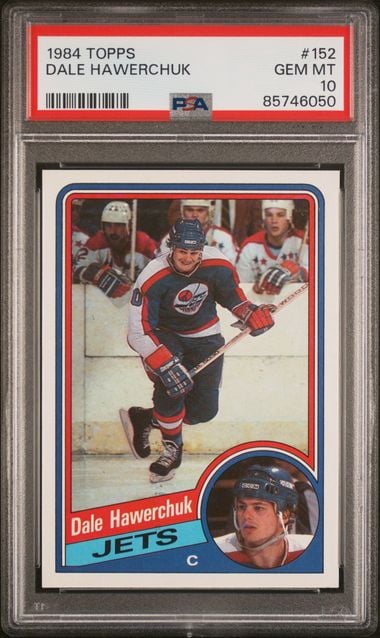
Card Identification as a Service
Snap a photo of any trading card and get instant, structured identification results. Raw cards, graded slabs, binder pages, stacks on a table — our AI pipeline handles them all. No manual data entry. No barcode scanning. Just point, shoot, and know exactly what you're looking at.
99.5%
Accuracy
<300ms
Response Time
8,250+
Sets Recognized
15M+
Reference Cards
Break out of the box.
Every other scanner makes you line up one card, dead-center, in perfect light, then wait while it applies antiquated image lookup techniques. CardSight AI's custom-trained computer vision reads the entire image at once, identifying every card in any real-world scenario — the difference between card identification your users tolerate and identification they love.
One card per image, built on image hashing or general-purpose ML like k-nearest-neighbor. Line it up, shoot, wait, repeat — for every single card.
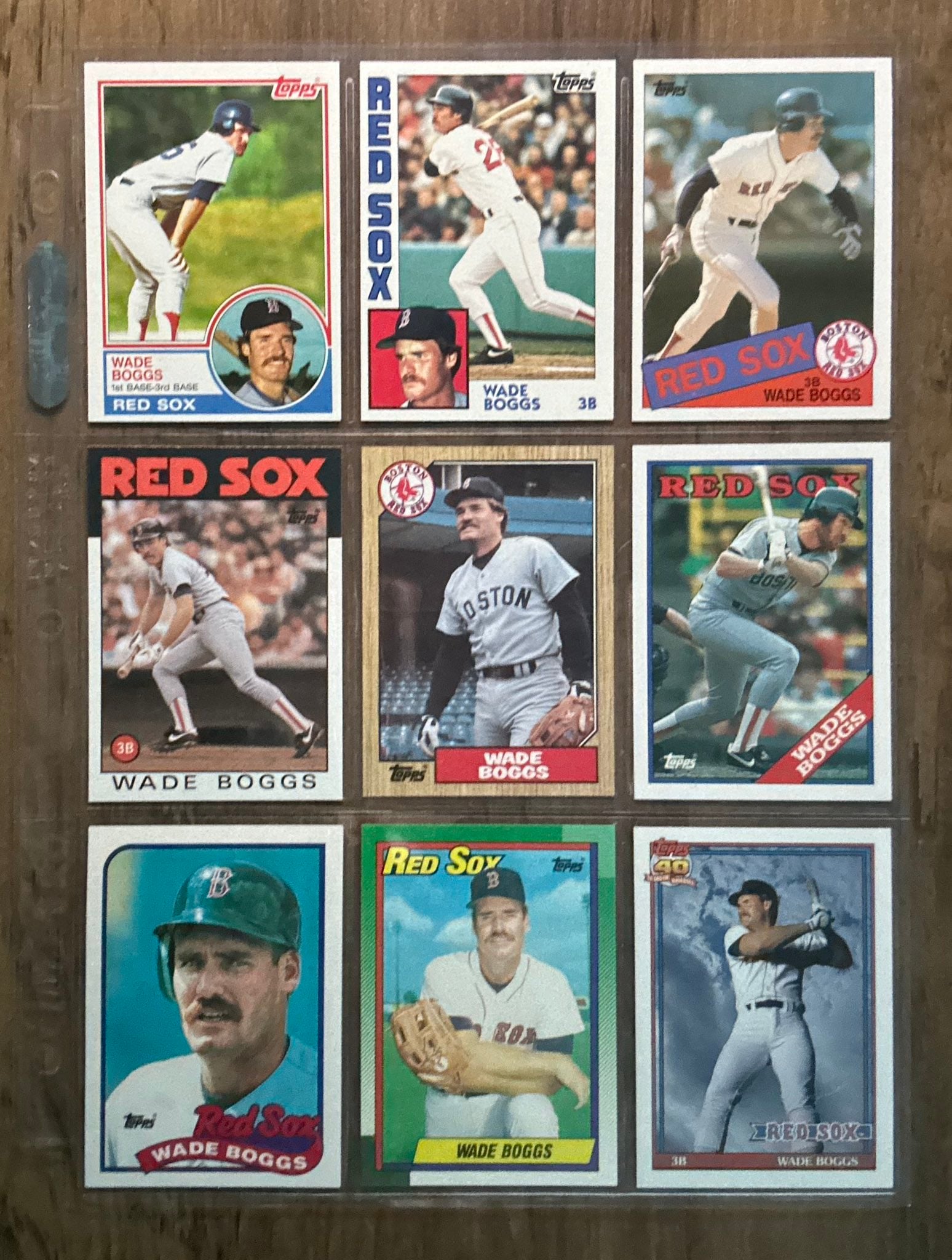
Purpose-built computer vision, trained on trading cards. Point once at the whole page — every card detected and identified at any angle, all at once.
Identifying these nine cards
One photo, nine cards. CardSight AI identifies them all at once — a competitor scanning one card per image takes over a minute to get through the same page.
Why developers and AI agents choose CardSight AI
Detection, not matching. Our AI detects and identifies every card in a single frame, at any angle — binder pages, stacks, showcases. Image-hashing and k-nearest-neighbor scanners match one pre-cropped card against a reference set: one card per request, and only when it's framed just right.
Constant speed as the catalog grows. Other companies use k-nearest-neighbor lookup which compares your photo against a reference library, so each query gets slower as that library grows. Our custom trained AI models run a fixed-cost inference no matter how large the catalog gets — 99.5% mAP, sub-300ms, and fast enough to identify cards in real-time streaming video, frame by frame.
One API you won't outgrow. Clean, structured JSON — card, set, year, number, and a confidence score — plus a 15M+ catalog, real market pricing, and collection management behind the same API. REST/OpenAPI, SDKs for Node.js, Python, Swift, Java & .NET, and MCP for Claude and ChatGPT: integrate by code or natural language.
Whether you're building a new app or adding card scanning to an existing platform, you're building on infrastructure that scales with you — not a single-card scanner you'll replace later.
How It Works
Three steps from photo to structured card data. Whether you're building a collection scanner, a marketplace listing tool, or an inventory management system, the flow is the same.
Upload Image
Send any photo of a trading card to the API. JPEG, PNG, WebP — raw cards, graded slabs, binder pages, or a pile on a table. No special lighting or framing required.
AI Processing
Our AI pipeline detects every card in the image, isolates each one, and matches it against a reference database of 15M+ trading cards spanning 8,250+ sets from 1933 to today.
Structured Results
Get back clean, structured JSON with card name, set, year, card number, subject, printed language, and a confidence score — ready to display, store, or pipe into your next workflow.
Capabilities
Built for the real world, not the lab. CardSight's AI pipeline was built using millions of real-world card images and handles the messy reality of trading card photography.
Multi-Card Detection
Upload a photo with multiple cards and the API detects and identifies each one individually. Scan a binder page, a stack on a table, or a show display case in a single call.
Raw Card Recognition
Identifies ungraded, raw cards in any orientation. The AI pipeline handles real-world conditions — slight angles, varying backgrounds, minor wear — without requiring a perfectly staged photo.
Graded Slab Detection
Recognizes cards encased in PSA, BGS, SGC, and other major grading company slabs. The AI pipeline sees through reflections and holder edges to identify the card inside.
Confidence Scoring
Every detection includes a confidence level — High, Medium, or Low — so you can build smart workflows. Auto-accept high-confidence matches. Flag low-confidence results for human review.
Real-World Conditions
Built using millions of real-world card images, not studio photos. The AI pipeline handles shadows, glare, angles, partial occlusion, and imperfect lighting gracefully.
Parallel Identification (Beta)
Every result names the exact card first. For baseball, it now also returns ranked parallel suggestions drawn from 17,000+ parallel patterns, colors, and designs across every supported set — refractors, prizms, color variants, and numbered parallels.
Language Detection
Reports the language a TCG card was printed in across eight languages — English, French, German, Italian, Spanish, Japanese, Korean, and Chinese — as an ISO 639-1 code on every detection.
Same-Art Disambiguation
Separates prints that share identical artwork. A Japanese card and its US counterpart look the same but carry different sets, numbering, and value — the AI pipeline tells them apart instead of guessing.
The Exact Card First. Then the Parallel.
Parallels are the hardest problem in card identification. An optical parallel — a refractor, a prizm, a holo — can look like three different cards under three different lights, and like the base card under a fourth. So the AI pipeline gets the card right first, then returns the parallel as a ranked set of suggestions rather than a single guess.
What comes back
The exact card — player, set, number — the way it always has. Alongside it, a ranked list of the parallels it is most likely to be. When a parallel is unmistakable, the top suggestion is a confident one. When lighting hides the difference, you see the candidates instead of a wrong answer.
Why suggestions, not a verdict
A wrong parallel is worse than no parallel — it misprices a listing and misfiles a collection. Suggestions let your app do the right thing: a seller taps the one they are holding, a marketplace shows a shortlist, an AI agent asks before it commits.
Beta scope
Baseball first: 17,000+ parallel patterns, colors, and designs across every supported baseball set. It arrives on the same identification endpoints you already call — no new integration — and other sports follow as the beta matures. The response fields are in the API reference.
The Card, and the Language It Was Printed In
The hard part of identification was never finding the card — it's telling two nearly identical cards apart. A Japanese print and its US counterpart usually share the same artwork, character, and frame. The picture matches. The set, the numbering, and what the card is worth do not.
When we have the international set
Identification returns that card's own catalog record directly — the international card, not an approximation of it.
When we don't have it yet
You get the US canonical card with the detected language reported alongside it. The old failure was a silent one — scan a Japanese card, get the US version back, and never know. Either way, you now know exactly what you're holding.
Coverage follows what each game is actually printed in — Pokémon and Magic: The Gathering in all eight, One Piece in the five languages Bandai publishes it in. It arrives through the same identification endpoints you already use — no new integration, no per-region product to maintain, and a Japanese card is no slower than an English one.
# Japanese print scanned
{
  "confidence": "High",
  "card": {
    "name": "Charizard ex",
    "number": "054",
    "releaseName": "Pitch Black",
    "fields": [
      { "key": "CARD_LANGUAGE", "value": "ja" },
      { "key": "RARITY", "value": "Special Illustration Rare" }
    ]
  }
}

// Or read it straight off the detection with the SDK helper:
getFieldValue(detection, 'CARD_LANGUAGE');  // "ja"
The detected language comes back as an ISO 639-1 code, so you can branch on it without parsing card names. Sports cards don't carry this field — it's returned on Pokémon, One Piece, and Magic detections.
Performance at Scale
Numbers that matter when you're building a product your users depend on. These aren't benchmarks from a controlled test — they reflect real-world production traffic across thousands of daily identifications.
99.5%
Accuracy (mAP)
<300ms
Response Time
8,250+
Sets Recognized
15M+
Cards in Database
Add Identification in Minutes
Install the SDK, pass an image, and get structured results. The API accepts any standard image format and returns clean JSON with card details and a confidence score for every detection.
Whether you're building a mobile scanning app, a desktop inventory tool, or a web-based marketplace — identification plugs in the same way. Native SDKs for Node.js, Python, Swift, Java, and .NET are available today, plus an OpenAPI 3.0 / Swagger spec for any other language.
# Node.js
import { CardSightAI } from 'cardsightai';
const client = new CardSightAI({ apiKey: 'your_api_key' });

const result = await client.identify.card(imageFile);
const detection = result.data.detections[0];
console.log(detection.card.name);        // "Mike Trout"
console.log(detection.card.releaseName); // "2011 Topps Update"
console.log(detection.card.number);      // "US175"
console.log(detection.confidence);       // "High"
Explore Our Platform
Identification is just one piece of the puzzle. Combine it with our catalog and collection management for a complete trading card platform.
Slab Identification
Read the slab, not just the card. Grading company, grade, and qualifiers from any photo.
Streaming Video
Real-time card identification from live video streams. Enterprise only.
Card Catalog
15M+ trading cards from 1933 to present. The most comprehensive card database available via API.
Price Data
Real marketplace sales and live listings. Data, not opinions. Live for every sport, Pokémon TCG, and One Piece TCG.
Collection Management
Let your users track, organize, and manage their card collections. Powered by the full catalog.
Frequently Asked Questions
Common questions about CardSight AI's visual identification capabilities, accuracy, performance, and integration.
CardSight AI achieves 99.5% mean average precision (mAP) across all supported sports, sets, and card conditions. This metric is measured on real-world production traffic — not controlled lab images. Our AI pipeline was built using millions of real-world card images covering varying angles, lighting conditions, backgrounds, and card conditions from 1933 to present.
CardSight AI identifies baseball, football, basketball, hockey, MMA, Pokémon TCG, Magic: The Gathering, and One Piece TCG trading cards from every major manufacturer including Topps, Panini, Upper Deck, Bowman, Donruss, Fleer, Leaf, and The Pokemon Company. The reference database contains 15M+ trading cards across 8,250+ distinct sets spanning from 1933 to present day, plus full US retail Pokémon TCG coverage across 172 sets dating back to Base in 1999 and full US retail One Piece TCG coverage across 56 releases since 2022. One Piece launched with identification, catalog, and market data all live. Magic: The Gathering is now available — card identification is live and 250+ releases are in the catalog, with market data coming soon. MMA is now available as well, with nearly 300 releases spanning 35+ years from Topps, Leaf, Panini, and other publishers. Pokémon, One Piece, and Magic identification also detects the language a card was printed in, so Japanese and other international prints are never silently returned as the US version. Other TCGs are on the roadmap.
Yes. CardSight AI detects the language printed on Pokémon, One Piece, and Magic: The Gathering cards, so a Japanese print is never silently returned as its US counterpart. When the international set is in our catalog, identification returns that card record directly. When it is not, you get the US canonical card with the detected language reported alongside it — the API returns the ISO 639-1 code (ja for Japanese) in the card's CARD_LANGUAGE field. Japanese cards identify through the same endpoints at the same sub-300ms speed as English ones, with no integration change.
Card identification detects eight printed languages: English, French, German, Italian, Spanish, Japanese, Korean, and Chinese. Coverage follows what each game is actually printed in: Pokémon and Magic: The Gathering in all eight, and the One Piece Card Game in the five languages Bandai publishes it in — Japanese, English, French, Simplified Chinese, and Korean. The detected language comes back as an ISO 639-1 code in the CARD_LANGUAGE field on every TCG detection, so your application can branch on it without parsing card names.
Yes. CardSight AI identifies cards encased in PSA, BGS, SGC, and other major grading company slabs. The AI pipeline handles case reflections, holder edges, and label overlays to identify the card inside. Both raw (ungraded) and graded cards are supported in the same API endpoint.
Yes. Multi-card detection is a core feature. You can upload a photo of a binder page, a stack of cards on a table, or a display case, and the API will detect and identify each card individually. Every detection comes back with its own card metadata and confidence score.
The median response time is under 300 milliseconds from image upload to structured result. This includes image processing, AI inference, and database matching. The API is designed for real-time applications like mobile scanning apps, point-of-sale systems, and live marketplace listings.
Yes, and for baseball it now goes further. Every result identifies the exact card first. The parallel identification beta then returns ranked parallel suggestions drawn from 17,000+ parallel patterns, colors, and designs across every supported baseball set — refractors, prizms, color variants, and numbered parallels. They come back as suggestions rather than a single verdict because optical parallels can look different under different lighting, so your app can confirm the top match or show a shortlist. The beta starts with baseball; other sports follow as it matures. For other sports today, parallel detection coverage varies by set and keeps expanding.
Tap any question to expand
CardSight AI achieves 99.5% mean average precision (mAP) across all supported sports, sets, and card conditions. This metric is measured on real-world production traffic — not controlled lab images. Our AI pipeline was built using millions of real-world card images covering varying angles, lighting conditions, backgrounds, and card conditions from 1933 to present.
CardSight AI identifies baseball, football, basketball, hockey, MMA, Pokémon TCG, Magic: The Gathering, and One Piece TCG trading cards from every major manufacturer including Topps, Panini, Upper Deck, Bowman, Donruss, Fleer, Leaf, and The Pokemon Company. The reference database contains 15M+ trading cards across 8,250+ distinct sets spanning from 1933 to present day, plus full US retail Pokémon TCG coverage across 172 sets dating back to Base in 1999 and full US retail One Piece TCG coverage across 56 releases since 2022. One Piece launched with identification, catalog, and market data all live. Magic: The Gathering is now available — card identification is live and 250+ releases are in the catalog, with market data coming soon. MMA is now available as well, with nearly 300 releases spanning 35+ years from Topps, Leaf, Panini, and other publishers. Pokémon, One Piece, and Magic identification also detects the language a card was printed in, so Japanese and other international prints are never silently returned as the US version. Other TCGs are on the roadmap.
Yes. CardSight AI detects the language printed on Pokémon, One Piece, and Magic: The Gathering cards, so a Japanese print is never silently returned as its US counterpart. When the international set is in our catalog, identification returns that card record directly. When it is not, you get the US canonical card with the detected language reported alongside it — the API returns the ISO 639-1 code (ja for Japanese) in the card's CARD_LANGUAGE field. Japanese cards identify through the same endpoints at the same sub-300ms speed as English ones, with no integration change.
Card identification detects eight printed languages: English, French, German, Italian, Spanish, Japanese, Korean, and Chinese. Coverage follows what each game is actually printed in: Pokémon and Magic: The Gathering in all eight, and the One Piece Card Game in the five languages Bandai publishes it in — Japanese, English, French, Simplified Chinese, and Korean. The detected language comes back as an ISO 639-1 code in the CARD_LANGUAGE field on every TCG detection, so your application can branch on it without parsing card names.
Yes. CardSight AI identifies cards encased in PSA, BGS, SGC, and other major grading company slabs. The AI pipeline handles case reflections, holder edges, and label overlays to identify the card inside. Both raw (ungraded) and graded cards are supported in the same API endpoint.
Yes. Multi-card detection is a core feature. You can upload a photo of a binder page, a stack of cards on a table, or a display case, and the API will detect and identify each card individually. Every detection comes back with its own card metadata and confidence score.
The median response time is under 300 milliseconds from image upload to structured result. This includes image processing, AI inference, and database matching. The API is designed for real-time applications like mobile scanning apps, point-of-sale systems, and live marketplace listings.
Yes, and for baseball it now goes further. Every result identifies the exact card first. The parallel identification beta then returns ranked parallel suggestions drawn from 17,000+ parallel patterns, colors, and designs across every supported baseball set — refractors, prizms, color variants, and numbered parallels. They come back as suggestions rather than a single verdict because optical parallels can look different under different lighting, so your app can confirm the top match or show a shortlist. The beta starts with baseball; other sports follow as it matures. For other sports today, parallel detection coverage varies by set and keeps expanding.